Nix is phenomenal. Nix makes hard things so easy that I'm astounded anyone is doing it any other way. There are whole classes of problems that you just can't encounter on Nix. I first dipped my toe in the water 4 months ago and it's been bliss.
Nix and NixOS have lots of different tendrils that impact different kinds of work. Here are the problems that they have solved for me.
Roses
Per Project Dependency Mangement
Each software project relies on slightly different environments. My site builder might need Node 24, my fork of an open source project needs Node 20, my work frontend might need Node 22. And maybe theres some program I like that only distributes through npm, so I need a global npm install.
For Node.js, the tool generally reached for is nvm which allows you to install parallel Node versions. I don't know how that interacts with a global npm, and thinking about that stresses me out -- but fair enough, let's use nvm. Problem solved.
Now repeat the same problem on the same machine for Python. And add in the system vendored Python. And the Homebrew version that you needed as a dependency for watchman. uv now solves this problem right? Great. But I installed uv through... pip? And pip is built with...Python I assume? Where is that stored? You know the xkcd.
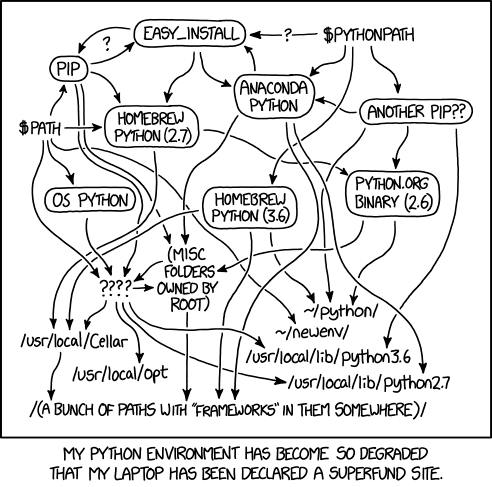
Repeat this for every language for every project on your machine. Cross your fingers that each project is set up to use nvm or uv or rvm so its clear what it needs. Every language has run into this problem and has come up with a bespoke version manager.
This really isn't a language problem, its an OS problem.
In Nix, you just drop a flake.nix in whatever folder you want to have certain deps installed, declare that this directory requires python@3.14, node@20.1, ruby@3.4 and you are done. Whenever you navigate to that directory, your shell will recognise and install the dependencies that project declares. When you navigate out of the directory, those versions disappear. Install as many parallel versions of dependencies as your like and they will never interfere with each other.
Entire System Config an a Git Repo
Even before I used Nix I wanted this. I did it with a bare config dotfile repo which worked decently for one machine but started to topple when you had multiple machines. The config dotfile repo works a bit differently from normal git usage, some of my existing git reflexes were a bit misplaced here. The bare dotfile repo made it easy to forget or miss staging files, since they are spread out over the whole machine I never really thought to add them in the moment.
Nix does not let you forget to commit anything, it will complain about dirty repos when you build and you can't do anything without building. Setting up a nix rebuild script is a rite of passage, which almost always starts with abstracting away git entirely.
Multiple Systems Config in the Same Git Repo
A big problem I ran into with the bare dotfiles repo is sharing them between multiple machines. I my old dotfiles repo had 1 branch per machine, but it's really not how git is meant to be used and I felt it. Sharing config between machines involved merging and managing git branches, often with conflicts.
Nix lets multiple machines' config live side by side, where you pass in the name of the machine you want to build as an attribute to the build command. Using home manager to handle all the dotfile writing, I can shard my dotfiles into different components, some in a shared directory and some parts in a host specific directory. This can be quite granular, e.g. all my tmux shortcuts and layout is shared between all machines but the tmux colour scheme is machine specific.
Build Errors For Whole Machine Config
When you build a NixOS config, it's like running a compiler on your whole machine. So many errors that you'd normally discover at runtime surface at build time, savings yourself so so so many disasters.
No Kipple
Kipple is useless objects, like junk mail or match folders after you use the last match or gum wrappers or yesterday's homeopape. When nobody's around, kipple reproduces itself. For instance, if you go to bed leaving any kipple around your apartment, when you wake up the next morning there's twice as much of it. It always gets more and more.
Phillip K. Dick, Do Androids Dream of Electric Sheep
It is inevitable that you install something as a one-off, and then you forget and that program lives on your machine forever. Nix makes this very hard to do since you have to declare all programs that you install, usually only in 1 place. So you can easily look at that list as cut the fat. If you have anything you only want to install once, you can use an ephemeral shell with that program installed. This will get garbage collected at some point down the track.
Single Language For All Server Config
Yes you need to learn the Nix language. Two counterpoints: AI makes learning a new language far, far easier than ever before, and, more importantly, you now only need 1 language for all configuration.
systemd services? Write it in Nix. Bash aliases? Write it in Nix. Nginx config? Caddy? ejabberd? sudoers? vim? sshd? docker? All able to write in Nix.
This also means you can share variables between all these configurations. An example:
# hosts/naboo/ports.nix
{
  http = 80;
  https = 443;

  nextcloudAio = 8080;
  nextcloudApache = 11000;

  penultimateGuitar = 3000;
  bingo = 3002;
  minecraftle = 3003;
  jiracule = 3004;
  spells = 3005;
  downtime = 3006;
  btopStream = 3007;

  chainmail = 8765;
  conductor = 8085;
  ollama = 11434;

  xmppClient = 5222;
  xmppClientTls = 5223;
  ejabberdHttp = 5280;
  xmppProxy = 7777;
}
This file contains constants of the ports that different services and programs run on my server. These constants are wired into all the different places that need them, e.g. Nextcloud port is wired into Nextcloud configuration and into Caddy configuration. This prevents this from ever drifting or colliding with each other. Beautiful.
First Class Support For My Own Packages
My own GitHub repos are supported just as well as the official nixpkg package repository. I just add one file to my project repo, add a link to that repo in my Nix configuration on a machine, and then I install it the same way I would install neovim.
For example, I packaged my university project for system programming duplicates, now I can install that on any Nix machine with 2 lines of code.
Amazing.
Migrating Machines
This is one you hear from Nix evangelists online, and the one you say isn't such a big deal from Nix detractors.
I was lucky that I first started dabbling with Nix one month before I got a new laptop. My old macbook had just been set up with nix-darwin. Setting up my programs and config on the new macbook was: git clone on the new machine, copy the old config, give it a new name for the new machine. Run rebuild... And it was done.
I still needed to copy over my /User/zach downloads and documents, as well as reconfigure macOS system settings and desktop applications that couldn't be covered by Nix. That didn't deter me though, my only regret after that was not investing even further into Nix.
Agents
Agents' being able to use Nix brings many of its advantages into focus, because they take full advantage of it. All my project devshells would be picked up, so no concerns about agents needing dependencies. Agents can read the whole system config and suggest fixes.
The fleet of agents I run on my server have access to the server config and can deploy services to it if I allow them. They install programs in ephemeral shells, they can introspect the server they are on. I've deployed entire web services from my phone -- without giving agents any more privileges than they actually need.
Buds
These are things that I often see listed as advantages that were not pros nor cons for me.
Bleeding Edge
Nix evangelists often talk about the number of and freshness of packages. This seems true but never actually mattered for me -- with one exception, wanting to use the latest version of Claude Code to test out new models. For the longest time on my macOS machines I was using the brew install of Claude Code, which often lagged days behind the latest version, barring me from the latest models at work. (median 1.6d lag in nixpkg, 10.8d lag on brew)
Perfect Reproducibility
While I suspect a lot of what I enjoy about Nix is enabled because it has perfect reproducibility, the reproducibility itself was not actually a particularly big draw for me. I do recognise that it is extremely cool.1
Thorns
It's Too Good
Nix is a worm that spreads via humans solving the problems it enables you encounter. I first touched Nix when installing NixOS on a new server to play around, and very soon I hit the flywheel.
install nixos on server
-> server config is easy, I'm now self hosting all the time
-> host an XMPP server so agents can communicate with me and each other
-> create custom XMPP client for agents to use to built utils for me
-> want my new utils to be consistently available on all my machines
-> begin setting up nix on my mac
-> set up flakes in all my repos so nix can handle dependencies
And that's it. My only complain is that it's too good.
I've fallen into the pattern of spinning up a flake, chucking it behind caddy with basic auth and bam! new web service.
I now run NixOS on my server, nix-darwin on two macOS machines, and nix packaging on every project I have. If you area software engineer who touches Linux, Nix is worth trying.
-
Especially when reading Farid Zakaria’s recent Nix saga is insane: Unifying all versions of all packages into one resolution tree; Making executables out of SQLite databases; Adding API routes to a SQLite executable with an
INSERTstatement?!?!; Making one flake that contains all flakes; Adding version ranges to Nix; Running any Nix package, any version, in your browser ↩